


Copyright © 2018-2025 by A.I.
ETH Zurich, Switzerland

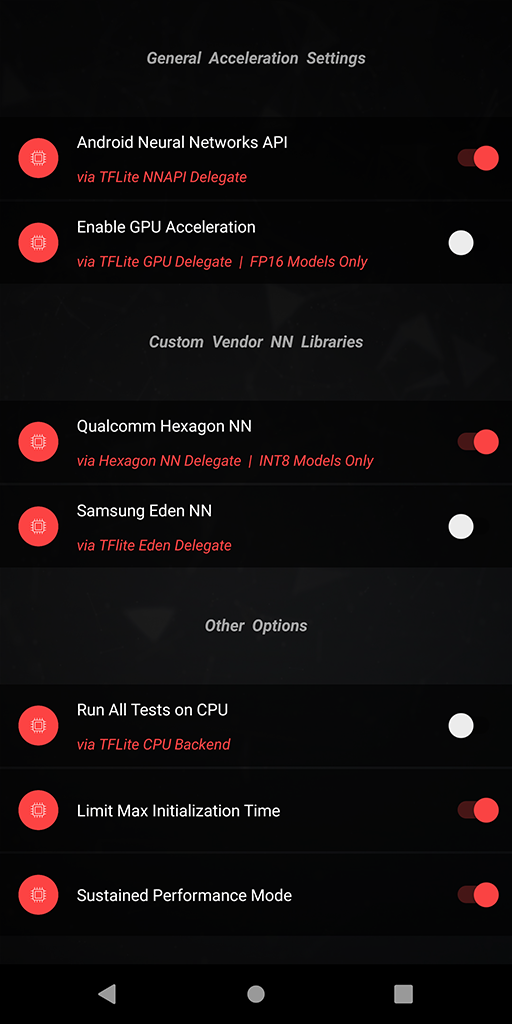 The following TFLite delegates are already available in AI Benchmark v4:
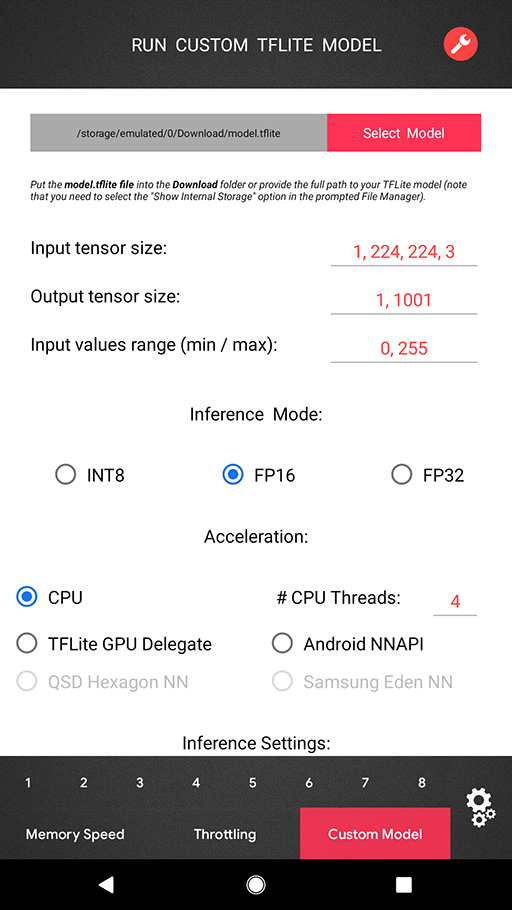 One can now load and run any TensorFlow Lite model directly in the benchmark (in the PRO Mode) with all acceleration options available for the standard benchmark tests. There is no need for using any complicated tools or Android programming — just put your model.tflite file into the Download folder, select the desired acceleration options (TFLite CPU backend, Android NNAPI, Hexagon NN / Eden / TFLite GPU delegates when available) and get the resulting latency or a detailed error log if the model is incompatible with the corresponding delegator. You can also select your model manually using the prompted File Manager — note that in this case the "Show Internal Storage" option should be enabled as the full path to your model file is required.
If you do not have any previous experience of working with the TensorFlow Lite, you can find the detailed instructions on how to convert your pre-trained TensorFlow model to TFLite format here (just three lines of code are needed). If you are using PyTorch — then you first need to export your model to ONNX and then convert the resulting file to TFLite. You can also quantize your model during the conversion to be able to run it on the Hexagon DSP, Google Coral TPU and some other integer-only mobile AI accelerators.
One can now load and run any TensorFlow Lite model directly in the benchmark (in the PRO Mode) with all acceleration options available for the standard benchmark tests. There is no need for using any complicated tools or Android programming — just put your model.tflite file into the Download folder, select the desired acceleration options (TFLite CPU backend, Android NNAPI, Hexagon NN / Eden / TFLite GPU delegates when available) and get the resulting latency or a detailed error log if the model is incompatible with the corresponding delegator. You can also select your model manually using the prompted File Manager — note that in this case the "Show Internal Storage" option should be enabled as the full path to your model file is required.
If you do not have any previous experience of working with the TensorFlow Lite, you can find the detailed instructions on how to convert your pre-trained TensorFlow model to TFLite format here (just three lines of code are needed). If you are using PyTorch — then you first need to export your model to ONNX and then convert the resulting file to TFLite. You can also quantize your model during the conversion to be able to run it on the Hexagon DSP, Google Coral TPU and some other integer-only mobile AI accelerators.
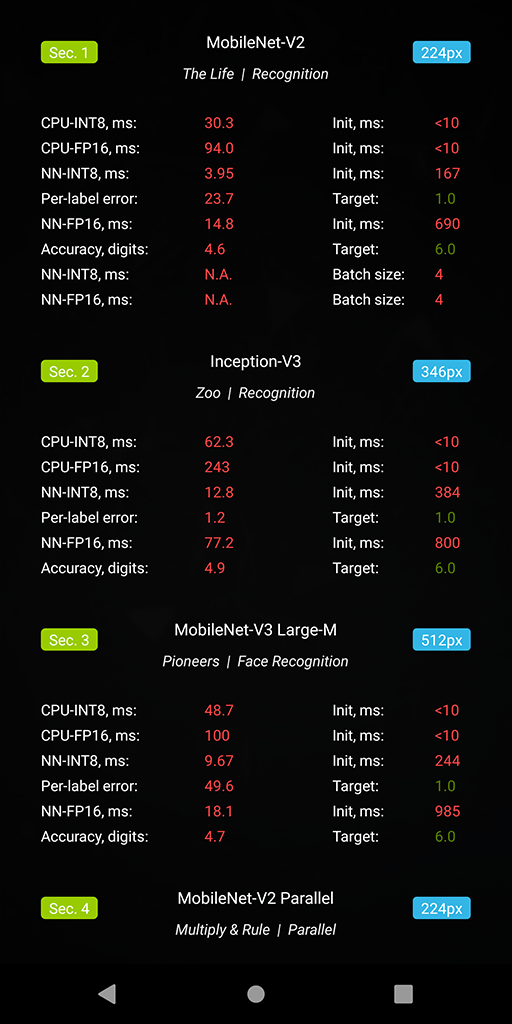 ● Section 1. Classification, MobileNet-V2
  There are two test categories in AI Benchmark v4 that should be mentioned separately. The first one is the Parallel Execution category that is aimed at processing multiple data simultaneously. It consists of three different tasks: inference with a large batch size in Section 1, running a floating-point and a quantized model in parallel to check acceleration support for mixed type inference in Section 11. Finally, in the last task the device is running up to 8 floating-point / quantized models simultaneously (Section 5) to see if it is capable of asynchronous model inference and acceleration, which is crucial for many real-world problems involving the use of more than one deep learning model.
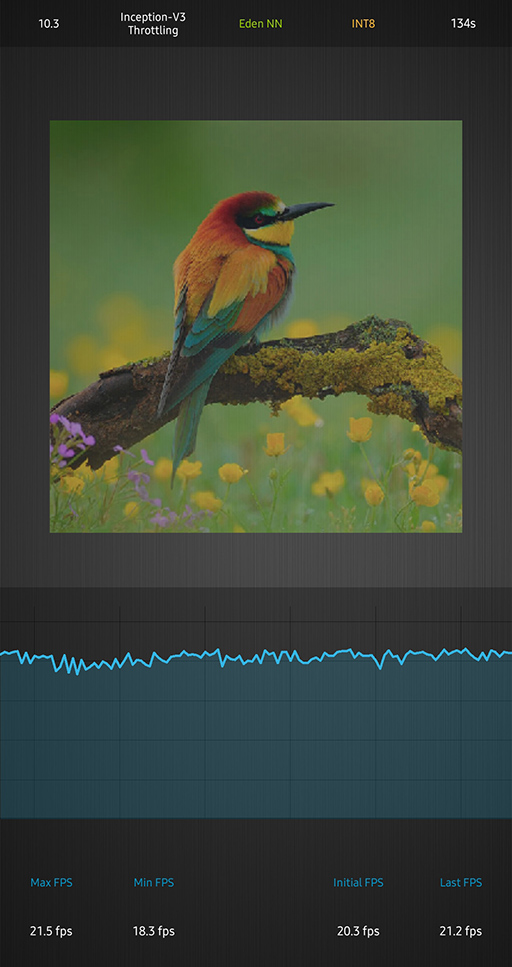
In the PRO mode, one can find a new Throttling Test that allows to run the Inception-V3 model on CPU or with any available acceleration option and monitor the resulting FPS over time. This test does not have a time limit, therefore it is possible to check both the short- and long-term thermal stability of the mobile chipset and all its components. We should note that this test will be significantly expanded in the next benchmark versions, introducing more models and considerably more complex setups.
There are two test categories in AI Benchmark v4 that should be mentioned separately. The first one is the Parallel Execution category that is aimed at processing multiple data simultaneously. It consists of three different tasks: inference with a large batch size in Section 1, running a floating-point and a quantized model in parallel to check acceleration support for mixed type inference in Section 11. Finally, in the last task the device is running up to 8 floating-point / quantized models simultaneously (Section 5) to see if it is capable of asynchronous model inference and acceleration, which is crucial for many real-world problems involving the use of more than one deep learning model.
In the PRO mode, one can find a new Throttling Test that allows to run the Inception-V3 model on CPU or with any available acceleration option and monitor the resulting FPS over time. This test does not have a time limit, therefore it is possible to check both the short- and long-term thermal stability of the mobile chipset and all its components. We should note that this test will be significantly expanded in the next benchmark versions, introducing more models and considerably more complex setups.
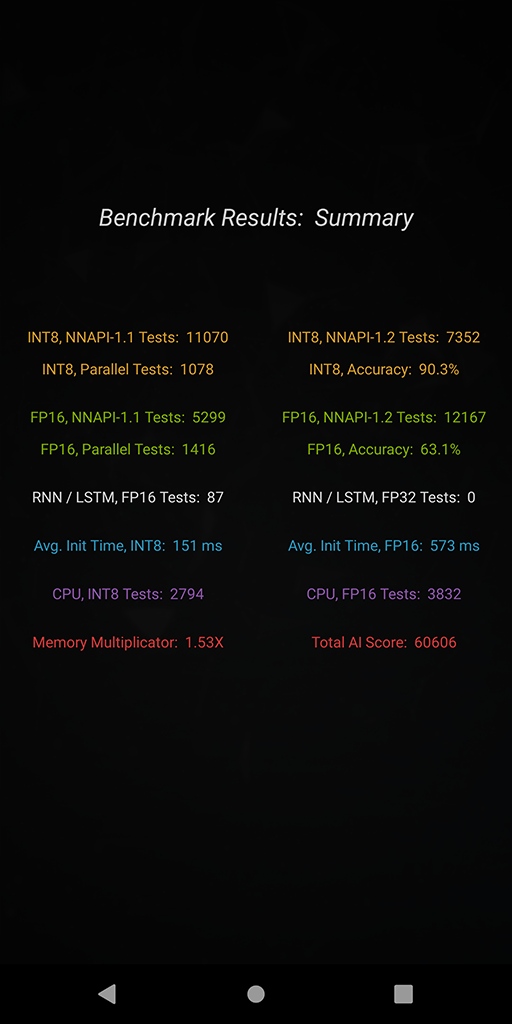 AI Benchmark v4 measures more than 100 different aspects of AI performance that are grouped in the following categories:
● INT8, NNAPI-1.1 Compatible Tests
● INT8, NNAPI-1.2 Compatible Tests
● INT8, Parallel Model Execution
● INT8, Single / Multi-Thread CPU Tests
● INT8, Accuracy Tests
● INT8, Initialization Time
● FP16, NNAPI-1.1 Compatible Tests
● FP16, NNAPI-1.2 Compatible Tests
● FP16, Parallel Model Execution
● FP16, Single / Multi-Thread CPU Tests
● FP16, Accuracy Tests
● FP16, Initialization Time
● FP16, RNN / LSTM Tests
● FP32, RNN / LSTM Tests
● FP16, Memory Tests
The weight of each test category is chosen according to its popularity among the research and development ML community and its relevance for mobile inference, therefore the final benchmark score is reflecting the actual user experience of running the existing AI applications on smartphones. More information about the scoring system will be provided in our next AI Benchmark paper, the previous report with a detailed overview of the last release can be found here.
AI Benchmark v4 measures more than 100 different aspects of AI performance that are grouped in the following categories:
● INT8, NNAPI-1.1 Compatible Tests
● INT8, NNAPI-1.2 Compatible Tests
● INT8, Parallel Model Execution
● INT8, Single / Multi-Thread CPU Tests
● INT8, Accuracy Tests
● INT8, Initialization Time
● FP16, NNAPI-1.1 Compatible Tests
● FP16, NNAPI-1.2 Compatible Tests
● FP16, Parallel Model Execution
● FP16, Single / Multi-Thread CPU Tests
● FP16, Accuracy Tests
● FP16, Initialization Time
● FP16, RNN / LSTM Tests
● FP32, RNN / LSTM Tests
● FP16, Memory Tests
The weight of each test category is chosen according to its popularity among the research and development ML community and its relevance for mobile inference, therefore the final benchmark score is reflecting the actual user experience of running the existing AI applications on smartphones. More information about the scoring system will be provided in our next AI Benchmark paper, the previous report with a detailed overview of the last release can be found here.31 May 2020 Andrey Ignatov |
Copyright © 2018-2025 by A.I.
ETH Zurich, Switzerland